CUDA Programming
- Connections speed comparison: GPU - GPU Memory > CPU - CPU Memory > CPU Memory - GPU Memory
- Kernel: A function that runs on the GPU. It is executed in parallel by multiple threads.
- CUDA threads need to be independent.
- GPU is a coprocessot to the CPU (aka host)
- GPU is organized as a grid of blocks of threads.
- Grid of Blocks 1D or 2D
- Blocks of Threads 1D, 2D, or 3D
- Threads in the same block can communicate together, but threads in different blocks cannot communicate with each other.
- Memory Model:
- Global Memory: Accessible by all threads; main mean of communication between host and device
- Textures and Constant Memory: Constants initialized by the host and available to all threads
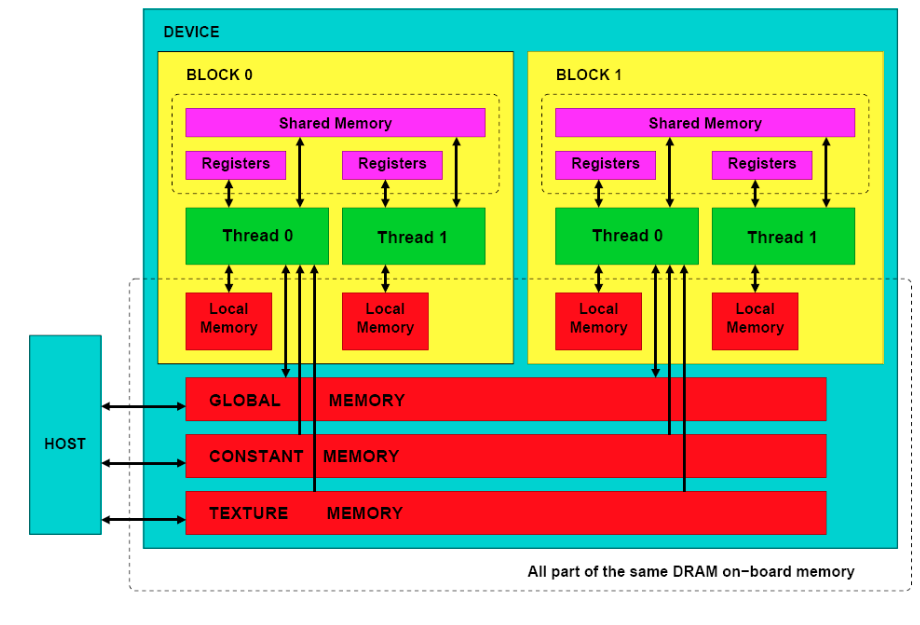
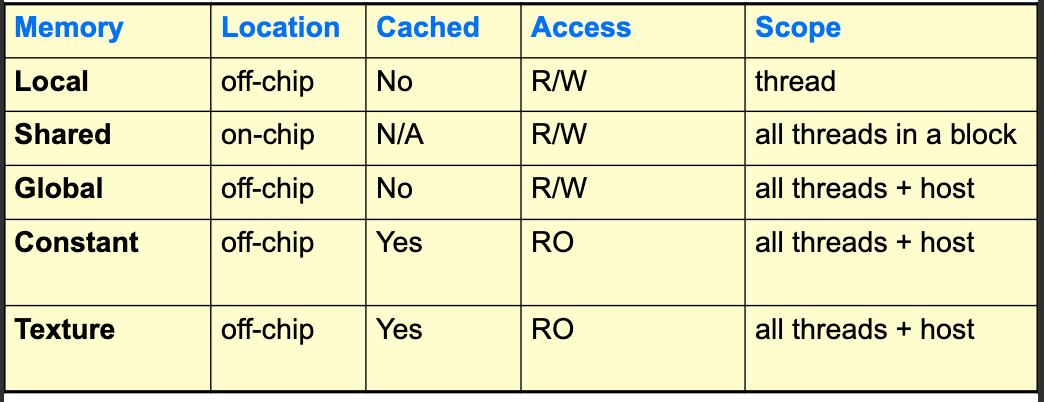
- Execution Model:
- Order is undefined; don’t assume bock 0 executes before block 1, or thread 0 executes before thread 1.
- All blocks are identical
- Same block threads can synchronize and share data fast
- Threads from differnt bock can’t cooperate and communicate only through global memory
- Each thread executes the same kernel, but with different data.
Coding
Running a kenel on GPU usually has this form:
- Allocate CPU data structure
- Initialize data on CPU
- Allocate GPU data structure
- Copy data from CPU to GPU
- Define execution configuration
- Run Kernel
- CPU synchronizes with GPU
- Copy data from GPU to CPU
- Deallocate GPU and CPU memory
CPU Memory Allocation
Use malloc
GPU Memory Allocation
Use cudaMalloc. It has the interface:
cudaMalloc(void **ptr, size_t nbytes);Example: (Note that the pointer is passed to the function as a pointer to pointer and that it’s explicitly casted to void**)
float *da;
cudaMalloc((void**)&da, N * sizeof(float));
Note that cudaMalloc allocates space in the global memory of the GPU.
To free GPU memory, use cudaFree:
cudaFree(void *ptr);Example:
cudaFree(da);Another valuable function is cudaMemset which initializes GPU memory to a specific value:
cudaMemset(void *ptr, int value, size_t nbytes);Example:
cudaMemset(da, 0, N * sizeof(float));Copying Data Between CPU and GPU
To move data between host and device, use cudaMemcpy:
cudaMemcpy(void *dst, void *src, size_t nbytes, enum cudaMemcpyKind direction);Example:
cudaMemcpy((void*)da, (void*)a, N * sizeof(float), cudaMemcpyHostToDevice);Regarding the direction parameter, it can take the following values:
cudaMemcpyHostToDevice: Copy data from host (CPU) to device (GPU)cudaMemcpyDeviceToHost: Copy data from device (GPU) to host (CPU)cudaMemcpyDeviceToDevice
This request is asynchronous from the CPU perspective, but the GPU will execute it in order with respect to other CUDA requests.
Defining Execution Configuration
When launching a kernel, we need to specify the number of blocks and threads per block. If you want to use \(N\) threads and each block has \(M\) threads, then you need \(\left\lceil \frac{N}{M} \right\rceil\) which can be computed as (N + M - 1) / M in integer division.
Running a Kernel and Synchronization
You use the function name followed by <<<blocks, threads_block>>> to launch a kernel. For example:
myKernel<<<blocks, threads_block>>>(args);Here threads_block is the number of threads per block and blocks is the number of blocks.
To synchronize the CPU with the GPU (ensure GPU execution is complete), use cudaThreadSynchronize:
cudaThreadSynchronize();The CPU doesn’t block on CUDA calls, and Kernel requests are queued and processed in order.
Copy Data Back to CPU and Deallocate Memory
Just use cudaMemcpy to copy data back to CPU and both cudaFree and free to deallocate GPU and CPU memory respectively.
Defining the GPU Kernel
To define a kernel, you use the __global__ qualifier.
In most kernels, you will need to access the unique thread ID. Here I mean the unique ID across all grids and blocks. You can compute it using gridDim.x, gridDim.y, blockIdx.x, blockIdx.y, blockDim.x, blockDim.y, blockDim.z, threadIdx.x, threadIdx.y, and threadIdx.z. The definitions are quite straightforward (somethingDim.d is the max allocated in d) and we are assuming 2D grids and 3D blocks. Of course this can be splified to lower dimensions if needed, where you won’t need to utilize all the dimensions. Needless to say, fill x, then y, then z.
The slides include extensive examples of how to compute the unique thread ID based on the dimensions of the grid and blocks (6 possible combinations). I won’t include them here, but generally speking, in all they first compute the block ID and then compute the thread ID within the block and then combine them to get the unique thread ID.
I will include only one example here for the case of 2D grid and 3D blocks (note that all other cases are just simplifications of this one; replace the dimensions with 1 and idx with 0 if they are not used). (Notice how the parentheses make it beautifull 😎)
UniqueBlockIndex = blockIdx.y * (gridDim.x)
                     + blockIdx.x;
UniqueThreadIndex = UniqueBlockIndex * (blockDim.x * blockDim.y * blockDim.z)
                     + threadIdx.z * (blockDim.x * blockDim.y)
                     + threadIdx.y * (blockDim.x)
+ threadIdx.x;The lecture seems to be mistaken in this case where it replaced threadIdx.z * (blockDim.x * blockDim.y) with threadIdx.z * (blockDim.y * blockDim.z)
A cool side-project + blog would be to create an algorithm that takes \(N\) grids deep structure (not just grids containing blocks, but grids containing grids containing grids, etc.) and a vector of dimensions for each level, \(d \in \mathbb{N}^N\), and then generates the code to compute the unique thread ID for that structure.
Using a variable for the size of each level would be quite helpful
CUDA Function Declarations
There are different qualifiers for functions in CUDA:
| Qualifier | Executed On | Called From |
|---|---|---|
__global__ |
Device (GPU) | Host (CPU) |
__device__ |
Device (GPU) | Device (GPU) |
__host__ |
Host (CPU) | Host (CPU) |
__global__ defines a kernel function. It must return void and can only call __device__ functions.
For function executed on device,
- No pointer to the function can be generated
- No recursion is allowed
- No static variables are allowed
- No variable number of arguments is allowed
Predefined Vector Data Types
I have stopped the notes at slide 40
Should be completed at a later time