Lecture 2: Software Testing Types and Techniques
We will divide testing into 3 types:
- Functional Testing
- Non-functional Testing
- Static Testing
Functional Testing
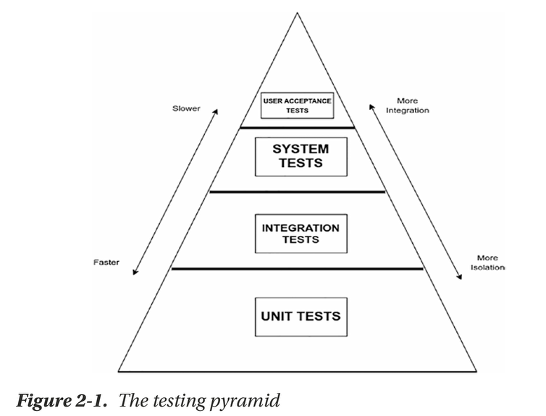
Functional testing validates whether the software operates as expected and meets user requirements. It is typically performed on multiple levels as shown in Figure fig-testing-pyramid.
Unit Testing
Unit testing is a software testing technique where individual units (smallest parts) of a software system, such as functions, methods, or classes, are tested in isolation to ensure they work correctly.
Features of unit testing:
- Isolation: Tests a function independently without relying on other components
- Automation: Performed using testing frameworks like JUnit (Java), NUnit (C#), and PyTest (Python).
- Coverage: Ensures all scenarios and edge cases are tested.
- Independence: Each test runs separately and does not depend on others.
Benefits of unit testing:
- Early Bug Detection: Identifies issues before they impact the full system.
- Faster Debugging: Helps locate problems quickly.
- Better Code Quality: Encourages writing cleaner, modular code.
- Improved Software Design: Promotes testable and maintainable code.
Integration Testing
Integration testing is a software testing process where multiple components or modules of a system are tested together to ensure they work correctly as a group.
Benefits of integration testing:
- Detects Interface Issues: Ensures different modules communicate correctly.
- Identifies Data Flow Problems: Prevents unexpected behavior between components.
- Reduces System Failures: Fixes issues before the final release.
- Improves Reliability: Ensures smooth user experience across the application.
Types of integration testing:
- Top-down integration: Testing begins with high-level components and proceeds downward.
- Bottom-up integration: Lower-level components are tested first before progressing upwards.
- Hybrid integration: A combination of top-down and bottom-up approaches.
- Big Bang integration: All components are integrated simultaneously and tested together.
- Incremental integration: Modules are integrated and tested progressively.
- Sandpit integration: New modules are tested separately in a controlled environment.
System Testing
System testing is a black-box testing approach conducted on a fully integrated system to ensure it meets specified requirements. It evaluates both functional and non-functional aspects of the software.
User Acceptance Testing (UAT)
UAT is conducted by end users, stakeholders, or domain experts to validate if the system meets business needs and functions correctly in a real-world environment. The key goal is to check the system’s usability.
There are 3 types of UAT:
- Alpha Testing: Performed by in-house developers or testers before releasing the product
- Beta Testing: Performed by a group of selected end users (outside the development team) in a real-world environment after alpha testing and just before marketing release
- Acceptance Testing: Performed by business stakeholders (people from the company or organization who own the project) right before the system is officially released or deployed
Nonfunctional Testing
Nonfunctional testing evaluates aspects of software beyond its core functionality, such as performance, security, and usability to ensure the software meets nonfunctional requirements and enhances user experience.
Performance Testing
Performance testing measures how well an application operates under specific workloads. It identifies bottlenecks and evaluates if the system can handle expected data volumes and user demands.
Common types of performance testing are:
- Load Testing: Analyzes performance under normal and peak conditions by simulating a high number of users and requests
- Volume Testing: Assesses system behavior under large data volumes
- Configuration Testing: Examines system behavior under different settings and configurations
- Comparative Testing: Compares multiple systems or configurations to determine optimal performance
Tools for performance testing:
- Load Testing Tools: Simulate multiple users and data loads to analyze system behavior, e.g. Apache JMeter.
- Performance Monitoring Tools: Identify bottlenecks and issues during testing by tracking CPU, memory, disk I/O, and network usage e.g. New Relic
- Log Analysis Tools: Analyze system log files to detect errors, slow requests, and other performance concerns, e.g. ELK Stack (Elasticsearch, Logstach, Kibana)
- Statistical Analysis Tools: Assess trends, patterns, and anomalies in performance test results over time, e.g. Python and R
Security Testing
Security testing identifies vulnerabilities and risks to ensure software safety
Techniques for security testing:
- Code Review: Analyzes source code for security flaws
- Authentication Testing: Evaluates the security of login and authentication processes
- Authorization Testing: Ensures users have appropriate access controls
- Encryption Testing: Verifies encryption strength and secure data handling
- Input Validation Testing: Assesses system protection against malicious input, e.g. SQL Injection.
Common Security Vulnerabilities:
- SQL Injection: Attackers insert malicious SQL queries to manipulate databases
- Broken Authentication: Weak password policies and session hijacking vulnerabilities
- Buffer Overflow: Excess data input leads to memory corruption
Usability Testing
Evaluates how intuitive and user-friendly a software product is
Focuses on:
- Ease of Learning
- Task Efficiency
- User Satisfaction
Scalability Testing
Evaluates whether a system can adjust to increased workloads efficiently.
It helps determine the maximum capacity the application can handle without performance degradation
Reliability Testing
Reliability testing measures system performance under different conditions over time to ensure stability.
Types of reliability testing:
- Faul Tolerance Testing: Ensures continued operation despite failures
- Recovery Testing: Tests the system’s ability to recover from failures
Availability Testing
Can be assessed using different metrics, including
- Uptime Percentage: The proportion of time the system is available
- Mean Time Between Failures (MTBF): Average time between system failures
- Mean Time to Repair (MTTR): Average time to restore the system after a failure
Compatibility Testing
Ensures a software application functions correctly across different environments.
Compatibility testing assess:
- Operating System Compatibility
- Browser Compatibility
- Database Compatibility
- Mobile Device Compatibility
Installability Testing
Test how easy it is to install the system.
Key aspects assessed are:
- Installation instructions: Clear, step-by-step guidelines must be provided.
- Installation process: It should be straightforward, without unnecessary complexity.
- Installation options: Users should have choices such as custom, silent, or network installation.
- Compatibility: The software must function across different hardware and operating systems without causing conflicts.
- Error handling: Clear error messages should be provided for failed installations.
- Uninstallation: The software should remove all components cleanly without leaving residual files or causing system instability.
Maintainability Testing
Maintainability testing evaluates how easily software can be updated, modified, and supported over time.
Factors assessed include:
- Code quality
- Documentation
- Code complexity
Compliance Testing
Compliance testing ensures that software adheres to legal, regulatory, and industry-specific standards.
Areas of focus:
- Legal and regulatory requirements
- Data Privacy
- Industry Standards
- Documentation
Static Testing
Verification technique that examines code and documentation without executing the program. It aims to detect errors early.
Types of static testing include:
- Code reviews: Experts analyze source code to identify defects and improve quality.
- Requirement reviews: Stakeholders ensure that software requirements are clear, complete, and aligned with user needs.
- Design reviews: Software design documents are evaluated to confirm technical feasibility and maintainability.